

LibreChat
Get your instance’s MCP URL from your administrator or Connect a client in the console. See connection prerequisites and sign-in before starting.
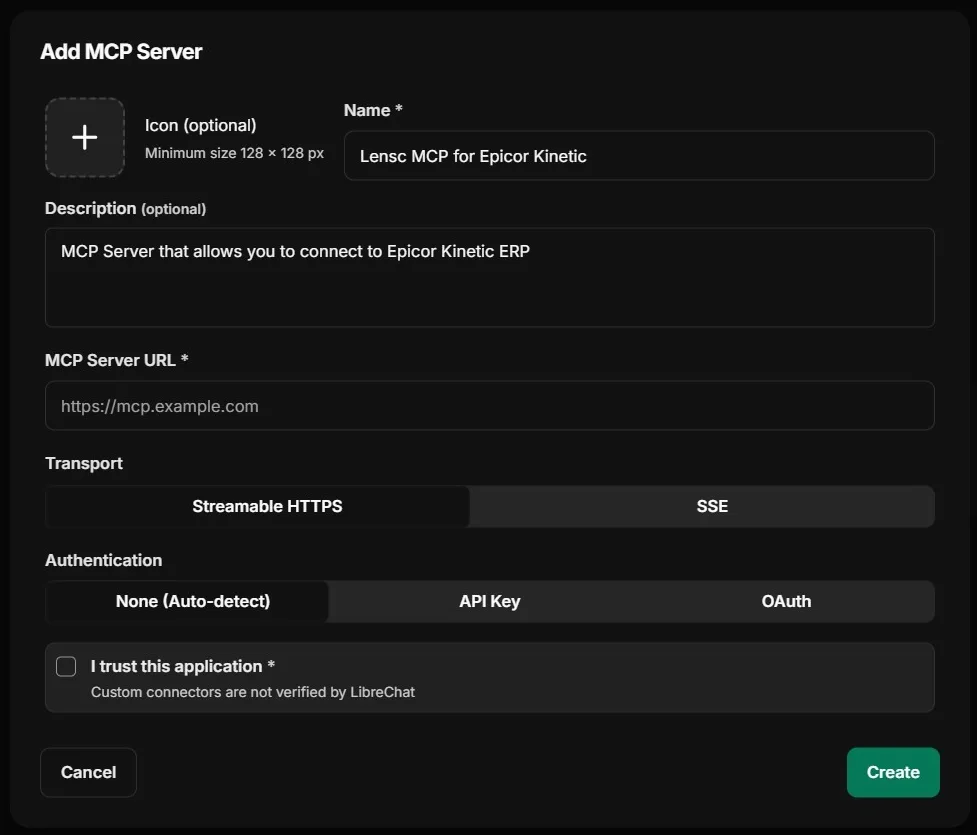
- Open MCP Settings in the sidebar and click the Add MCP (+) icon.
- Enter a name and description, and paste your MCP URL as MCP Server URL. Leave the transport on Streamable HTTP. Do not choose SSE.
- Tick I trust this application and click Create.
- Click the Connect icon next to the server, then click Authorize.
Complete the Epicor sign-in and Cutova approval, then try your first tool call.
Epicor® and Kinetic® are trademarks of Epicor Software Corporation. Cutova is an independent product and is not affiliated with, endorsed by, or sponsored by Epicor Software Corporation.
Cutova, a product of Lens Software LLC